Page 1 of 1
Neo-Geo Layout
Posted: Tue Apr 03, 2018 8:24 pm
by FrizzleFried
Anyone need a Neo Geo layout for their arcade cabinet? I'm just about happy with this one. Very simple... no "options" ... but I DID ...ahem... "borrow" the animation code from the SDARCADE layout and tweaked it a little to be used for the wheel art on this one...
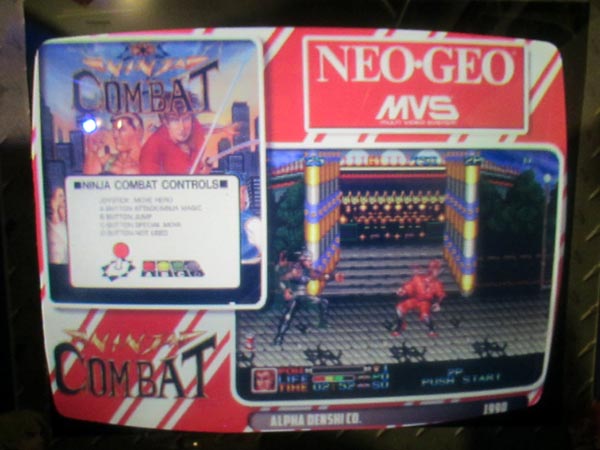
- NEOGEOSKIN1.jpg (67.38 KiB) Viewed 12015 times
Re: Neo-Geo Layout
Posted: Tue Apr 03, 2018 8:27 pm
by FrizzleFried
I'd love to add a "shadow effect" to the wheel art. Not sure exactly how I can do that to be honest with you... any suggestions?
Re: Neo-Geo Layout
Posted: Wed Apr 04, 2018 3:39 am
by FrizzleFried
Re: Neo-Geo Layout
Posted: Wed Apr 04, 2018 4:38 am
by FrizzleFried
Here you go... very simple layout...
Mini-marquees go in the Marquee folder... snaps/vids in the snaps folder, etc..
Uses the animate module...
Re: Neo-Geo Layout
Posted: Thu Apr 05, 2018 2:09 am
by FrizzleFried
...and because I am never satisfied... ever...
May I introduce you to... version 1.1:
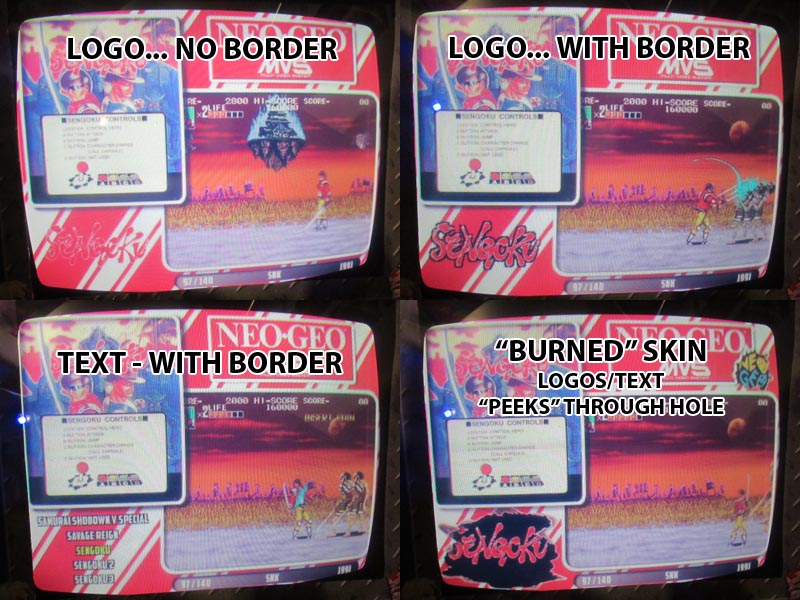
- NEOGEOFE1.jpg (144.17 KiB) Viewed 11985 times
First I made a new "skin" because I wasn't happy with how the logos in the wheel looked on the colored background... then before I finished the new skin I learned a trick which enabled me to essentially add a "border" around the logo artwork (and text).... so I implemented that... and because I liked the skin I was working on that had a "burn hole" where the logo wheel is, I figured I'd include both skins...
SO...
Two skins... you can choose logo with or logo without border... or text...

Oh, and I added a little animation to the mini marquee (zoom).
EDIT: >ARGH< file is too large (300K or so) to attach... I'll have to add it somewhere and post a link...
EDIT #2: Here you go...
DOWNLOAD HERE
Re: Neo-Geo Layout
Posted: Thu Apr 05, 2018 12:02 pm
by mR_CaESaR
This would be awesome for a Yoko setup!
But I haven't got that yet.. I'm still umming and ahhing if I should go raspberryjamma or groovymame pc setup..
Re: Neo-Geo Layout
Posted: Mon Dec 03, 2018 6:10 am
by Hashman
I love this layout.
I just downloaded a full set of the mini marquees and im not sure where to put them on the SD CARD so they overwrite the existing ones?
Also I have videos snaps. How do I make them show instead of the static PNG files in this layout.
Sorry for the noob questions.
Re: Neo-Geo Layout
Posted: Mon Dec 03, 2018 4:32 pm
by FrizzleFried
The Neo-Geo mini-marquees all go in the previews/marquees folder...
The movie files all go in the previews/snaps folder...
Re: Neo-Geo Layout
Posted: Tue Dec 04, 2018 9:58 am
by Hashman
Thank you!